

You want to build an app that controls a DJI drone, but you don’t know where to start. This guide is for you.
Apps that control DJI drones are normal Android apps. They show live data from the drone, such as telemetry and the camera feed, and they send commands back to it. So how does an Android app talk to a drone?
The answer is the DJI Mobile SDK V5 (MSDK V5).
Quick answer: DJI MSDK V5 is a library you add to an Android project. It lets your app read information from a DJI drone and send commands to it, through the remote controller. You build a normal Android app, and MSDK handles the connection to the drone’s hardware.
Prefer to watch? This guide is also available as a video on the DroneDev Academy YouTube channel.
What you will learn
By the end of this guide, you will know five things:
- What MSDK is
- What it gives you
- What you can build with it
- What you need to start
- What it cannot do
I’m Peiman, and I’ve built drone applications for industrial projects. I know how confusing the first steps can be. So think of this guide as a map: the map you need before you write your first line of code.
What is DJI MSDK V5?
Start with the big picture. There are three parts in the chain:
Your Android app → Remote controller → Aircraft
Your app is on one side. The aircraft is on the other side. The remote controller sits in the middle. The app talks to the controller, and the controller talks to the aircraft.
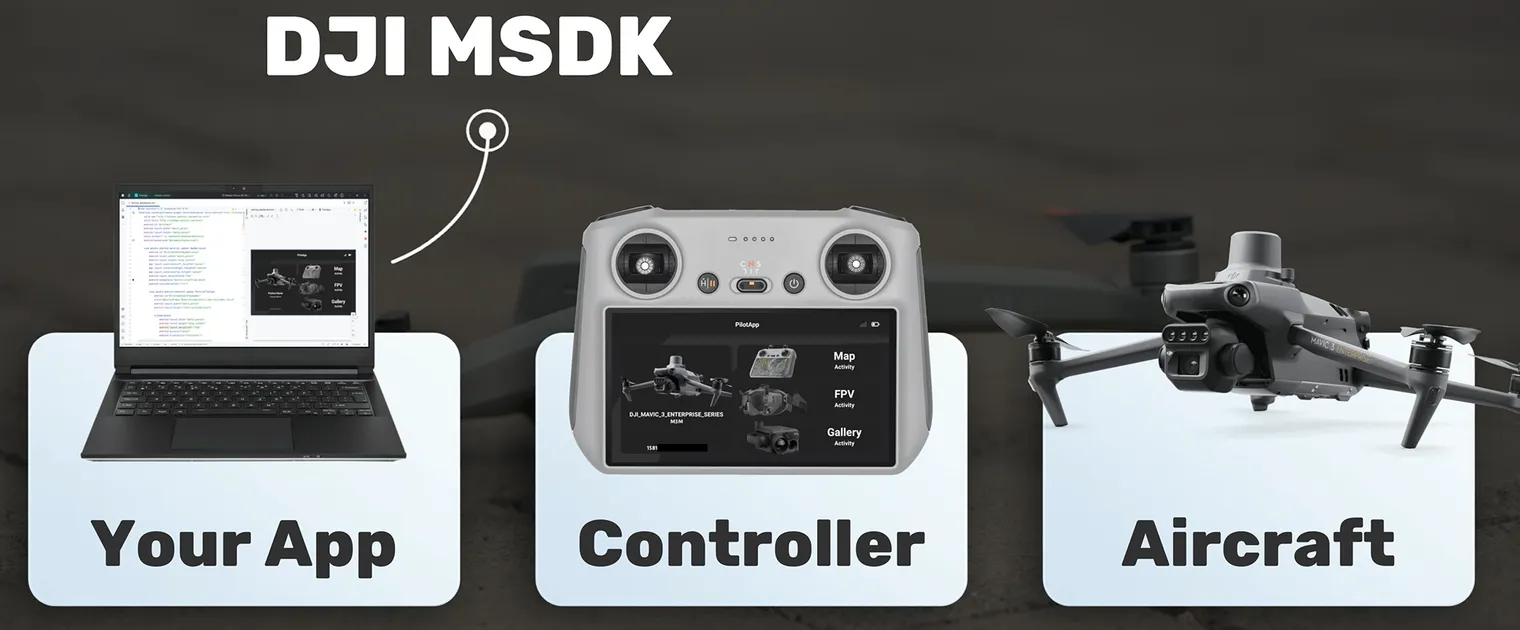
So how does your app join this chain? With MSDK.
MSDK is a library you add to your Android project. Think of it as the door to the drone. Through this door, your app reads information from the drone and sends commands to it. You don’t need to build the connection to the hardware yourself. MSDK does that part.
Your app does not run on the drone
This surprises many beginners. Your app runs on one of two devices:
- A controller with a built-in screen, such as the DJI RC Plus. The app runs on the controller itself.
- A phone connected to the controller, when the controller has no screen of its own.
In my industrial projects, we used enterprise drones, so the app ran on the controller.
A drone app is a normal Android app
Here is some good news. If you already build Android apps, you already know most of the tools:
- Android Studio
- Kotlin or Java
- Activities and Fragments
- Building screens and layouts
The only new part is MSDK, and MSDK is simply a library. A library is ready-made code. You add it to your project, and you call it from your own code.
You already do this with other libraries. A networking library helps your app talk to a server. In the same way, MSDK helps your app talk to a drone. You add it with Gradle, you call its functions, and MSDK does the hard work of talking to the drone.
Android app + MSDK = a drone app
If you are an Android developer, you already know a big part of the road.
What does MSDK V5 give you?
I put MSDK’s features in two groups:
- Fundamental features: functions almost every drone app uses.
- Specialized features: functions you add only when your type of app needs them.
These are examples, not a complete list. The API reference has everything.
Fundamental features
- Drone information. Which drone is connected? What is its model and firmware version?
- Telemetry. Live data from the drone: where it is, how high, how fast, and how much battery is left.
- Basic flight functions. Takeoff, landing and return to home.
- Camera and gimbal control. Take a photo, start or stop a video, and move the gimbal.
- Live video. See what the drone’s camera sees, right inside your app.
- Storage. Check the memory card, and view or download the photos and videos on it.
…and more. In my experience, almost every drone app needs functions like these.
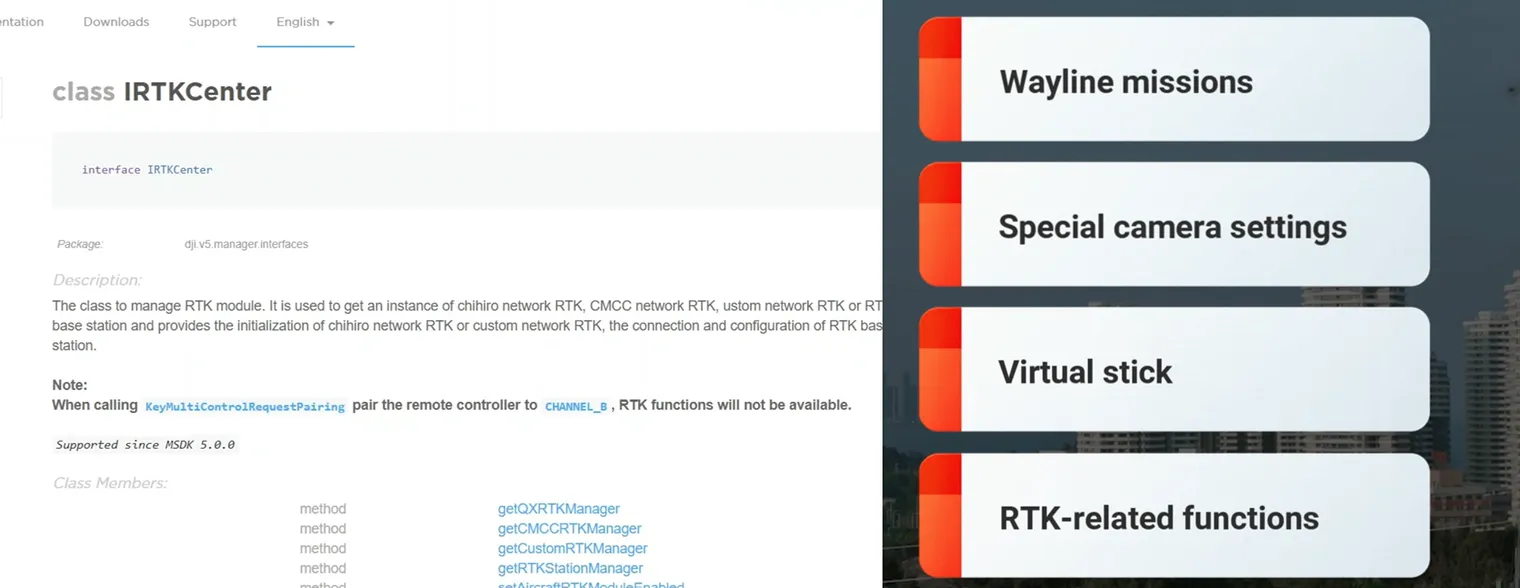
Specialized features
- Wayline missions. You give the drone a planned route, and it flies the route by itself, again and again. In my industrial projects, this was one of the main features.
- Special camera settings. Beyond photos and video, you can control things like zoom, exposure, or thermal camera options.
- Virtual stick. Your app sends stick commands to the drone, like moving the real sticks. So your code can fly the drone in its own way. This needs care, and safety comes first.
- RTK-related functions. RTK gives a much more accurate position than normal GPS. Your app can check the RTK status and work with it.
…and more. You choose these based on your project.
What can you build with DJI MSDK?
Every app below uses the same base of fundamental features. Only the specialized parts change.
1. Inspection apps
Think of solar panels, wind turbines or buildings. Inspecting them by hand is slow, and it can be dangerous. With an app, the drone flies a planned route, takes the photos, and can fly the same route again next month. That repeatability is the real value for inspection.
- Fundamental: telemetry, camera, storage
- Specialized: wayline missions
2. Farm monitoring and mapping apps
Farms are large, and walking through a whole field takes a long time. A drone can fly a pattern over the field, take the pictures, and use RTK to know the exact positions.
- Fundamental: camera, storage
- Specialized: wayline missions, RTK
3. Video in special conditions
Sometimes the normal controller is not enough. You may need exact camera settings or very controlled movements. An app can set the camera exactly as you want, move the drone with virtual stick commands, and show the live video at the same time.
- Fundamental: live video, camera
- Specialized: special camera settings, virtual stick
These are only three examples. The same features are used in public safety, education and research too. So when you plan an app, ask one question:
Which of these features does my job need?
What do you need to start?
Here is the short checklist:
- A supported drone and controller. Always check DJI’s official supported list, because not every DJI drone works with MSDK.
- Android Studio with the versions DJI recommends. Java, Kotlin, Gradle and the Android Gradle Plugin must match DJI’s suggested versions. They change with each MSDK release. My MSDK V5 setup guide lists the exact versions.
- A DJI developer account. You create an app on the DJI developer portal and get an app key. Your app uses this key to register the SDK.
- A safe way to test. DJI’s simulator lets you test your flight logic without a real flight every time.
- Android basics. You must know the basics of Android development. Advanced Android skills are not required to start, but they help you build better apps.
How to start: the road in four steps
- Create your app on DJI’s developer site and get your app key.
- Add MSDK to your Android project. (Step by step: How to set up DJI MSDK V5 in an Android project.)
- Register the SDK in your app and connect to the aircraft.
- Read your first value from the drone, such as the battery level.
Then you add more features, one by one.
Where to read the DJI MSDK documentation
There are four places to read:
- Tutorials and release notes on DJI’s developer site. They explain the concepts and what changed in each version.
- The API reference. It helps you find the exact class and method names when you write code.
- The GitHub sample app. It shows working code from DJI.
- The DJI developer forum. You can read questions from other developers and ask your own.
A good habit: when you need a feature, look for it in the sample app first. Then read its details in the API reference.
What MSDK V5 is not: five common mistakes
Knowing these early can save you days.
1. It does not work with every DJI drone
MSDK V5 supports a limited list, mostly enterprise aircraft, such as the Matrice and Mavic 3 Enterprise series, and a few consumer models, such as the Mini 3 and Mini 4 Pro. Always check DJI’s official list before you buy a drone for a project.
2. It is not the only DJI SDK
- MSDK is for apps that run on a controller or a phone.
- Payload SDK is for building your own device that mounts on the drone.
- Cloud API is for connecting your own cloud platform to drones and docks.
Which one you need is the topic of my next guide.
3. MSDK V5 is for Android only
DJI states that MSDK V5 is available only for Android.
4. V5 is not V4
MSDK V5 is a newly developed SDK, and many things are different from V4. When you search for a tutorial or an answer, always check that it says V5.
5. The UX SDK is optional
The UX SDK is a set of ready-made screen parts, such as a live video view or a battery indicator. In V5, it comes inside DJI’s open-source sample project, not as a separate library. You don’t have to use it. You can build your own screens.
Where this fits: one real app
In my course, I build one app step by step. It has five screens, and each one uses the features from this guide:
- Dashboard: drone information and telemetry
- Map: where the drone is
- Camera: camera control and live video
- Media: storage
- Mission: wayline missions
The same ideas you just read about, in one real app.
Key takeaways
- DJI MSDK V5 is a library that lets a normal Android app talk to a DJI drone.
- The chain is app → controller → aircraft. Your app runs on the controller or on a phone, never on the drone.
- Features come in two groups: fundamental ones that almost every app needs, and specialized ones you add for your type of app.
- Before you start, check the supported list, use DJI’s recommended versions, and get an app key.
- Search for V5 answers, not V4. They are different SDKs.
Frequently asked questions
Does DJI MSDK V5 work on iOS?
No. DJI states that MSDK V5 is available only for Android.
Which drones does MSDK V5 support?
Mostly DJI enterprise aircraft, plus a few consumer models such as the Mini 3, Mini 3 Pro and Mini 4 Pro. The list changes, so always check DJI’s official supported list.
Does a DJI MSDK app run on the drone?
No. It runs on a controller with a built-in screen, such as the DJI RC Plus, or on a phone connected to the controller.
Can I use Kotlin with DJI MSDK V5?
Yes. A DJI drone app is a normal Android app, so you can write it in Kotlin or Java.
Do I need the UX SDK?
No. The UX SDK is a set of optional ready-made screen parts that ships inside DJI’s sample project. You can build your own screens instead.
Is a tutorial for MSDK V4 useful for V5?
Not often. V5 is a newly developed SDK with many differences, so look for material written for V5.
Next steps
Ready to write code? Follow my step-by-step guide: How to set up DJI MSDK V5 in an empty Android project. It takes you from a new Android Studio project to an app that registers with DJI’s servers.
Keep building with DroneDev Academy
This guide is part of DroneDev Academy, where I teach drone software development from real project experience. Here is where to go next:
- Watch it on YouTube. This guide has a video version. Subscribe at youtube.com/@DroneDevAcademy to catch new tutorials as they come out.
- Read more guides. Step-by-step articles on DJI Mobile SDK V5 are collected on the guides page.
- Join the course early. The full DroneDev Academy course starts with this same SDK and goes further, toward PX4 and ArduPilot. Join the early-access list to hear first when it launches.
If you got stuck somewhere, write to me at info@dronedevacademy.com. I read every message.