

You want to build an app for a DJI drone. So you buy a drone. You set up your project. You write your first lines of code.
And then you find out: this drone is not supported.
Or maybe the drone is on the list, but your controller is not. Now you have lost money and time.
So how do you know before you buy? This guide gives you the answer, and shows you how to check any DJI drone yourself.
Quick answer: DJI Mobile SDK V5 (MSDK V5) supports mostly enterprise drones, such as the Matrice 400, Matrice 4 series, Matrice 350 RTK, Matrice 300 RTK, Matrice 30 series and Mavic 3 Enterprise series. Only three consumer drones are supported: the Mini 4 Pro, Mini 3 and Mini 3 Pro. Each drone is supported only with specific controllers, so always check the aircraft and the controller together on DJI’s official list.
Prefer to watch? This guide is also available as a video on the DroneDev Academy YouTube channel.
Checked against: MSDK V5.20.1, November 2026. The video was recorded with the V5.18 list, so it does not show the Matrice 5T, which DJI added in V5.20.1. The list changes, so always check the official page before you buy.
What you will learn about supported DJI drones
- What “supported” really means
- The three DJI drone groups, and which ones MSDK V5 covers
- The enterprise drones on the list, with their controllers
- The three consumer drones on the list
- How to check any DJI drone yourself
I’m Peiman. In the years I have developed apps for drones, I faced this problem myself: which drone, with which controller, works with MSDK V5? The official list can be confusing. Let’s read it together.
One note before we start: this guide covers MSDK V5 only, DJI’s Mobile SDK for Android apps. Other DJI SDKs, such as the Payload SDK and Cloud API, have their own lists.
What does “supported” mean?
“Supported” means MSDK V5 can work with the drone. Your app can:
- Read data from it, such as telemetry and live video
- Send commands to it, such as takeoff
If a drone is not supported, MSDK V5 does not work with it, and your app cannot control it. So in this guide, “Can you program it?” means “Is it supported by MSDK V5?”
DJI supports a pair, not a drone
This is the most important part. DJI does not support the drone alone. It supports a pair: the aircraft and the remote controller.
This is because your app talks to the controller, and the controller talks to the aircraft. If the controller has a screen, your app can run on it. If not, your app runs on a phone connected to the controller. (New to this chain? Read What Is DJI MSDK V5? first.)

The official list also shows firmware versions for each aircraft and controller. So remember three things, always together:
- Aircraft
- Controller
- Firmware
The three DJI drone groups
Before you read the list, you need to know how DJI groups its drones. There are three main groups:
- Consumer drones are made for photos, video and travel. Examples are the Mini series, the Air series and the Mavic 3 Pro.
- Enterprise drones are made for professional work, such as inspection, mapping and public safety. Examples are the Matrice series and the Mavic 3 Enterprise series.
- Agriculture drones are made for farms, for spraying and spreading. The Agras series is the example.
Now look at the MSDK V5 list:
- Enterprise: most of the list
- Consumer: only three drones, all from the Mini series
- Agriculture: none
What DJI support says about the future
In October 2026, I asked DJI support about consumer drones. In their email reply, they said that:
- Other consumer drones are not supported, and there are currently no plans to support them.
- Going forward, MSDK will mainly focus on enterprise aircraft.
So if you plan a long-term project, an enterprise drone is the safer choice.
The enterprise drones supported by MSDK V5
Here are the enterprise drones on the list, grouped by family, with their controllers.
- Matrice 400: DJI RC Plus 2
- Matrice 4 series (Matrice 4E, 4T, 4D and 4TD): DJI RC Plus 2
- Matrice 350 RTK: DJI RC Plus
- Matrice 300 RTK: DJI RC Plus, or DJI Smart Controller Enterprise. It is the only enterprise aircraft listed with two controllers.
- Matrice 30 series: DJI RC Plus
- Mavic 3 Enterprise family (Mavic 3 Enterprise series, Mavic 3M and Mavic 3TA): DJI RC Pro Enterprise
- Matrice 5T: new in MSDK V5.20.1. Check the official list for its controller and firmware.
All of these controllers have a screen, so your app can run directly on the controller.
The list also includes payloads, such as the Zenmuse cameras. Payloads are a topic for another guide.
The three consumer drones supported by MSDK V5
Only three consumer drones are on the list, and all of them are from the Mini series:
- DJI Mini 4 Pro: DJI RC-N2 or DJI RC-N3
- DJI Mini 3: DJI RC-N1 only
- DJI Mini 3 Pro: DJI RC-N1 or DJI RC Pro
Look at the controllers:
- The RC-N1, RC-N2 and RC-N3 have no screen, so your app runs on a phone connected to them.
- The RC Pro has a screen, so your app can run on the controller.
Every other consumer drone is not supported
Examples include the Mini 5 Pro, the Air series, the Mavic 3 Pro and the Mini 2.
Be careful with bundles
Some drone bundles come with a different controller. For example, a Mini 3 sold with a controller other than the RC-N1. If the controller in your bundle is not on the list, the pair is not supported, even if the aircraft is.
How to check any DJI drone yourself
Checking a drone takes two minutes:
- Open the DJI developer site.
- Go to the Mobile SDK section and open the MSDK release notes.
- Find the section called “Supported Product List and Firmware Version”.
Then:
- Find your aircraft.
- Find its controllers under it.
- Check the firmware versions for both.
If your aircraft or your controller is not there, it is not supported.
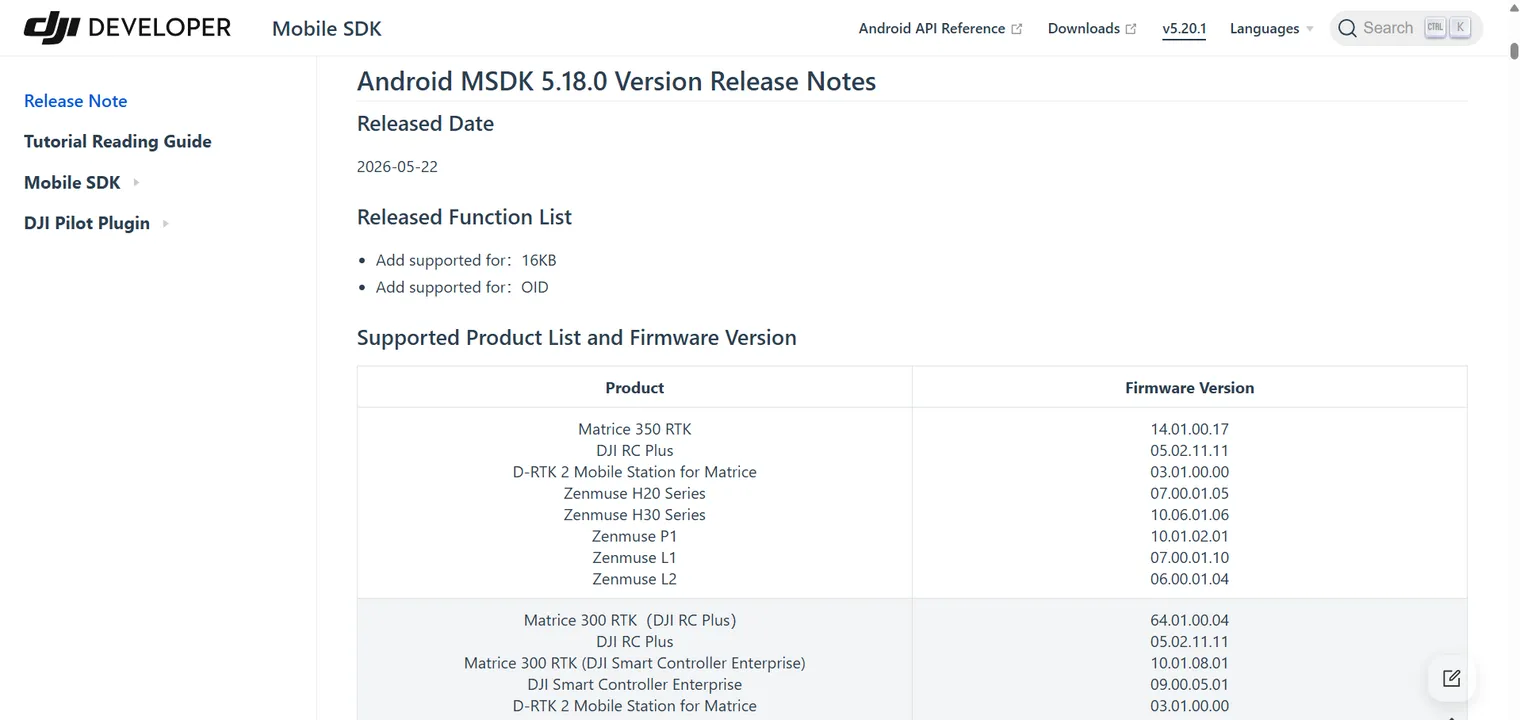
One last tip: the list changes. Check it again on the day you buy, and look at the MSDK version on the page.
The Developer Scorecard: how to choose a drone
When you choose a drone for a project, answer four questions about it:
- Is it supported by MSDK V5?
- Which controller does it use?
- What is listed with it? (payloads and accessories)
- What is it best for?
Here is an example from a drone I have used with MSDK V5, the Matrice 300 RTK:
- Supported by MSDK V5: Yes
- Controller: DJI RC Plus, or DJI Smart Controller Enterprise
- Listed with it: Zenmuse H20, H30, P1, L1 and L2, and the D-RTK 2 Mobile Station
- Best for: inspection and mapping with interchangeable payloads
You can use the same scorecard for any drone on the list.
Key takeaways: which DJI drones MSDK V5 supports
- A DJI drone is supported as a pair: the aircraft and its controller, with the right firmware.
- MSDK V5 is mainly for enterprise drones. Only three consumer drones are supported: the Mini 4 Pro, Mini 3 and Mini 3 Pro.
- No agriculture drones are on the list.
- DJI support says MSDK will mainly focus on enterprise aircraft going forward.
- Check the official list on the day you buy, including the controller in your bundle.
Frequently asked questions about MSDK V5 supported drones
Is the DJI Mini 4 Pro supported by MSDK V5?
Yes, with the DJI RC-N2 or RC-N3 controller. Your app runs on a phone connected to the controller.
Is the DJI Mini 5 Pro supported by MSDK V5?
No. At the time of writing, the Mini 5 Pro is not on the MSDK V5 supported list.
Are the DJI Air series drones supported by MSDK V5?
No. The Air series is not on the list. The only supported consumer drones are the Mini 4 Pro, Mini 3 and Mini 3 Pro.
Are DJI Agras drones supported by MSDK V5?
No. No agriculture drones are on the MSDK V5 list.
Can I use any DJI controller with a supported drone?
No. DJI supports specific aircraft and controller pairs. If your controller is not listed with your aircraft, the pair is not supported.
Where is the official MSDK V5 supported list?
On the DJI developer site, in the MSDK release notes, in the section called “Supported Product List and Firmware Version”.
Does MSDK V5 work on iOS?
No. MSDK V5 is for Android only. Learn more in What Is DJI MSDK V5?
Next steps after you choose a supported drone
- New to MSDK? Start with What Is DJI MSDK V5? A Beginner’s Guide for Android Developers.
- Have a supported drone? Set up your project with How to set up DJI MSDK V5 in an empty Android project.
Keep learning DJI drone programming with DroneDev Academy
This guide is part of DroneDev Academy, where I teach drone software development from real project experience. Here is where to go next:
- Watch it on YouTube. This guide has a video version. Subscribe at youtube.com/@DroneDevAcademy to catch new tutorials as they come out.
- Read more guides. Step-by-step articles on DJI Mobile SDK V5 are collected on the all DroneDev Academy guides.
- Learn MSDK V5 step by step. In the full DroneDev Academy course, we learn the fundamentals of DJI drone programming and build a real drone app together, from zero. See the DroneDev Academy course.
If you got stuck somewhere, write to me at info@dronedevacademy.com. I read every message.